
Hipobuy Spreadsheet shelves to price on the estimator
Sixteen product shelves. Each has a product photo and a corresponding category or search link. Each shelf opens live listings you can buy through Hipobuy.
Picture shelves, heaviest boxes first
Ordered roughly by how much box a typical item brings to a parcel, from stiff jackets to jewellery. The order is ours and only a rule of thumb; the pictures identify each category, while the notes explain its packing considerations.
 OuterwearStiff sleeves, big boxCategory
 SneakersShoe box counts as volumeCategory
 BagsLight but shapelessCategory
 HoodiesHeavier cotton than teesCategory
 JeansWeighs more than it looksCategory
 WomenswearSearch results, mixedSearch results
 SweatpantsRolls into a small bagCategory
 T-shirtsLightest of the clothesCategory
 HatsSquash flat in a parcelCategory
 JewelleryGrams, padded in a boxCategory
 Sports jerseysConfirm team, season, size and any personalisation.Category
 BeltsCheck usable length and buckle dimensions.Category
 EyewearConfirm frame width, lenses and included case.Category
 PerfumeConfirm liquid acceptance before paying.Category
 WatchesCheck case size, movement and battery restrictions.Category
 ElectronicsConfirm model, voltage, battery and route acceptance.Category
Text shelves
For batteries, liquids and fragile accessories, check acceptance before comparing shipping prices. A category link helps you browse; it does not confirm that a particular item can travel on your chosen route.
Shelf listing to Hipobuy cart, in three moves
A shelf is a starting point, not a verdict. The listings behind each card come from sellers on Chinese marketplaces, and prices, photos and stock change without warning.
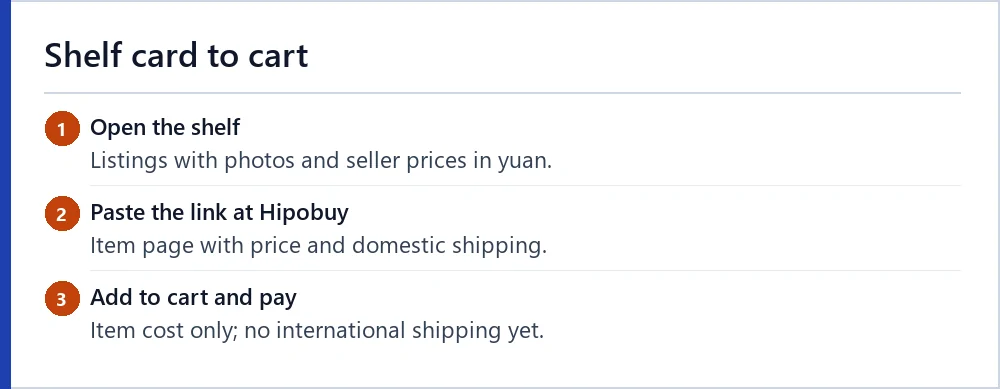
Paste the listing address into the search bar at hipobuy.com. The site opens the product, shows the seller’s yuan price beside your display currency, and lets you add it to the cart.
The product price never appears on the shipping estimator. The estimator only knows weight, size, destination and, if you choose one, product type.
From a shelf to a usable purchase instruction
Open a candidate listing and choose the exact size, colour and quantity before copying the product URL into Hipobuy. Check whether the selected option changes the price or included pieces. A catalogue card can help you find an item, but it does not reserve stock or establish that two similarly photographed products are equivalent.
Keep a short record of the seller’s measurements, material and domestic delivery charge. This gives the buying agent a precise request and gives you something to compare with the warehouse arrival. The Spreadsheet itself does not process the purchase. If the link cannot be read, confirm the required manual-order information rather than substituting a guessed price or an unrelated product page.
Why the shelf order follows the box
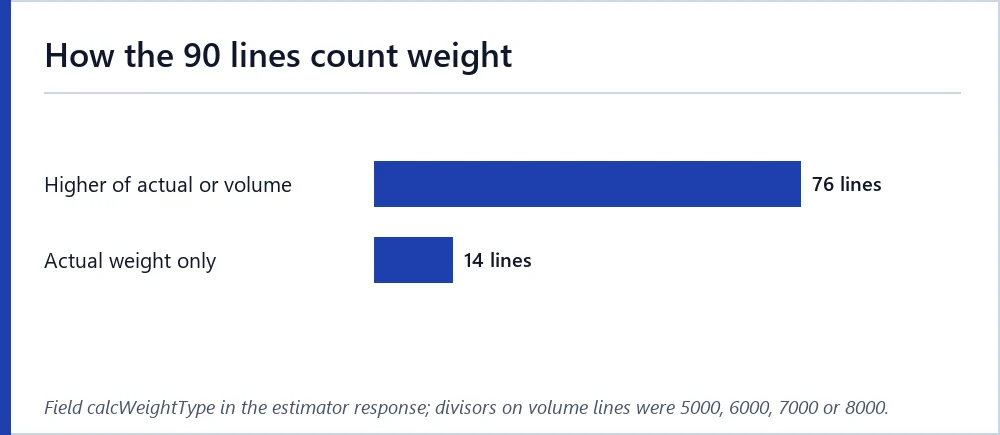
Shelves shape the quote in two ways. Weight is the obvious one. Size matters on more lines than you might expect: of the 90 lines in our snapshot, 76 charge the higher of actual and volumetric weight.
A padded jacket or a boxed pair of shoes can push a parcel past its scale weight on those lines. Jewellery, caps and tees rarely do. That is why the picture shelves above run from bulky to compact.
If you plan to combine items, the quote reader shows each line’s first weight and step for the 1,000 g query, which tells you how finely a line counts grams.
Using the shelves with the estimator
Pick a shelf, open three listings for the same kind of item and compare what the seller lists: weight if given, materials, box or no box. The heavier and boxier option will usually sit higher on any line’s price ladder.
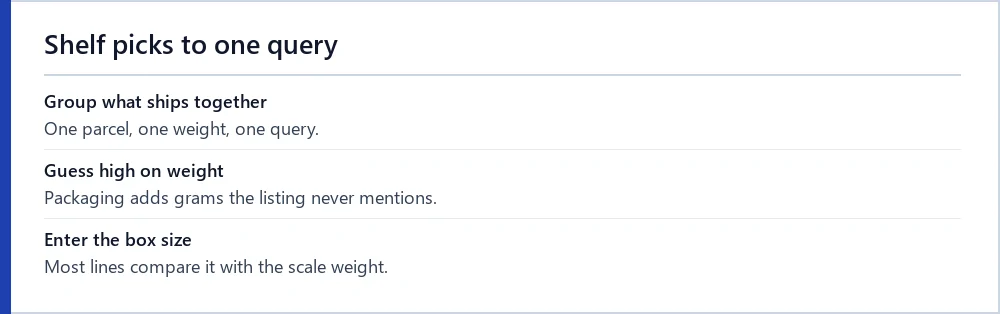
Then run the estimator with a realistic weight for everything you plan to send together, not for one item. A single tee at 250 g and four tees at 1,000 g can land on different cheapest lines, because each line has its own first weight.
Next steps
Ready to read a quote of your own? Run the estimator with your parcel, then put the two prices into the quote reader to label each figure.